
Fridge Hero: Track Leftovers
Jurasco Inc.Food & Drink
3.626.00 Reviews
- Version
- 1.9.4
- Installs
- 10.00K
- Age Rating
- Everyone
Screenshots
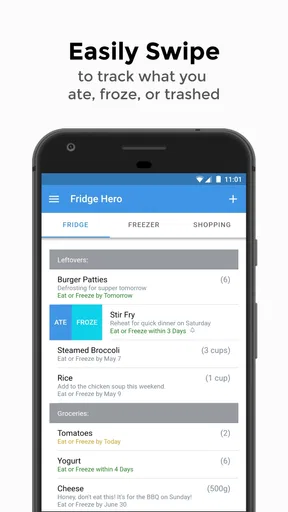
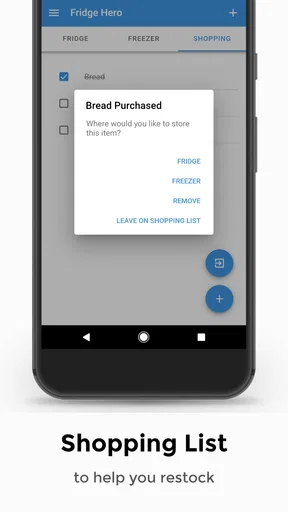
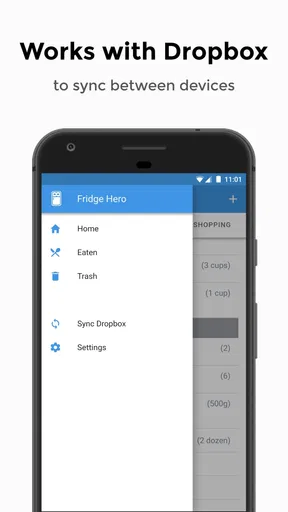
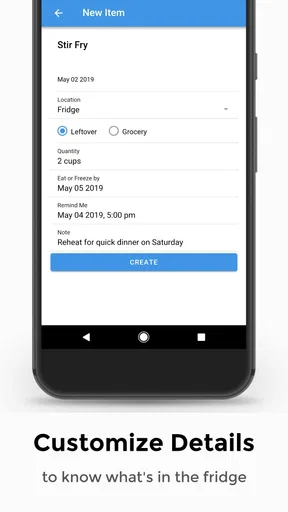
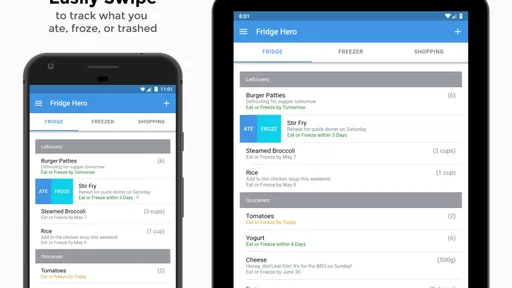
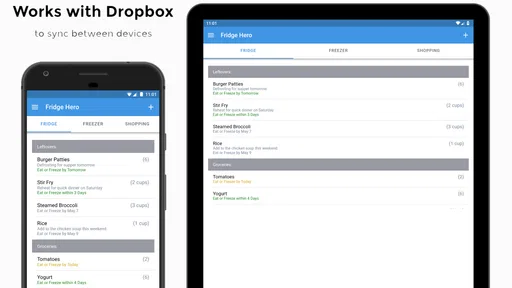
Our Review of Fridge Hero: Track Leftovers
 Analysis by Appyee
I tend to notice food waste most clearly when I find an old container at the back of the fridge or buy something I already had at home. Fridge Hero: Track Leftovers takes aim at that everyday problem with a simple idea: keep a digital view of pantry items, chilled food, frozen products, and leftovers so expiry dates are easier to remember. I tried to approach it as a practical household tool rather than a novelty, and that is where it makes the most sense.
This is a free Food & Drink app from Jurasco Inc., with an Everyone age rating. Its current version is 1.9.4, and it has built a modest user base of over 10 thousand installs. The average rating sits at 3.6 from around 90 ratings, which suggests a useful but not universally smooth experience. I can understand that middle-ground reaction: the purpose is immediately clear, but the value depends heavily on whether you are willing to maintain your inventory.
How Fridge Hero fits into a real kitchen
The app is most useful when I treat it as a quick household checklist, not as a fully automatic food-management system. I can imagine opening it after a grocery trip, adding items while putting them away, and checking it before deciding what to cook. That small habit can prevent duplicate purchases and make forgotten food more visible.
A realistic example would be a busy weekday evening. Instead of opening the refrigerator and guessing which leftovers should be eaten first, I would check the entries I created earlier and choose the item with the nearest expiry date. The benefit is not dramatic automation; it is a little less mental effort at the exact moment when convenience usually wins over careful planning.
The same approach works for a freezer. Frozen food is easy to ignore because it rarely looks urgent, so a dated record can encourage me to rotate older items before adding another bag or container. Pantry goods benefit in a different way: they are often bought in multiples, and a visible inventory can show whether I actually need another packet, jar, or can.
The key strength is turning hidden food into a visible routine. That sounds basic, but it changes the decision from “What might be in the kitchen?” to “What needs attention first?” For someone living alone, that may reduce forgotten leftovers. For a family, it can give everyone a shared reference instead of relying on one person’s memory.
Adding food without making the system a chore
The biggest practical question is whether recording food takes less effort than the waste it prevents. If I add every item individually, the process can feel tedious after a large shop. I would therefore use it selectively: leftovers, opened packages, short-life produce, and expensive items deserve entries first. Long-life staples that I buy constantly may not justify the extra tapping every time.
That selective workflow is one of the more useful ways to approach the app. It avoids the trap of trying to create a perfect database of every crumb in the home. A partial inventory that covers the food most likely to be forgotten can be more sustainable than a complete inventory abandoned after one ambitious weekend.
I would also add food at the moment it enters storage rather than postponing the task. A product still in a shopping bag is easy to identify, while a crowded fridge makes later sorting slower. For leftovers, recording them immediately after cooking is especially sensible because the container may otherwise lose its identity by the next day.
The app’s focus on expiry dates gives it a clear purpose, but users still need to enter dates carefully. A wrong date can create false confidence, while an omitted item remains invisible. This is not a criticism unique to this product; it is the unavoidable trade-off of a manual tracker. The app can organize what I record, but it cannot know what I forgot to record.
Why a fridge, freezer, and pantry view matters
Separating food by storage area is more helpful than keeping one long shopping-style list. When I am preparing dinner, I care about the refrigerator and leftovers. Before shopping, I may care more about pantry stock. When planning meals for the coming week, the freezer view can reveal ingredients that would otherwise remain buried.
That distinction also supports a useful “use location before buying” habit. I could check the freezer before purchasing another frozen meal, then inspect the pantry before adding another staple. This is a small but non-obvious advantage over a basic notes app, where storage context usually disappears inside a flat list.
Compared with writing expiry dates on paper, the app should be easier to consult when the kitchen is busy and less likely to be misplaced. Compared with a general reminder app, it keeps food-related information together rather than mixing it with appointments, bills, and personal tasks. The trade-off is that a notes app may be faster for someone who only tracks a few leftovers, while Fridge Hero becomes more worthwhile as the number of food categories grows.
What the current release tells me
The app was released on May 14, 2019, and the current version, 1.9.4, shows that it has continued beyond its initial launch. I see that as a sign of product continuity rather than proof that every rough edge has disappeared. A version number alone does not tell me how extensive the changes were, so I would judge the present experience by how reliably the inventory routine fits daily life.
For existing users, a maintained current version is reassuring because they are not relying on an abandoned experiment. It also means that someone returning to the app after a break should start by checking the current interface and reviewing old entries rather than assuming everything works exactly as it did at release. Food records can become stale even when the software remains usable, so a clean-up pass is part of returning to the system.
New users should begin with a small test rather than entering the entire kitchen. I would create a handful of entries for foods I genuinely need to monitor, use the app through one shopping cycle, and then decide whether expanding the inventory feels worthwhile. This approach quickly answers the most important question: does the tracking process fit my habits?
The app is free to install, although in-app purchases are listed at $9.49 per item. That makes it easy to try without an initial purchase, but I would pay attention to what is included before committing to any optional purchase. The free starting point is valuable for testing the workflow, especially because the app’s usefulness is personal and depends on consistent use rather than a single impressive feature.
Where it can save time, and where it cannot
Fridge Hero can save time during planning because it gives me one place to inspect food that is spread across several storage areas. It can also reduce the awkward moment of discovering an old container and wondering when it was prepared. For households that regularly cook in batches, this kind of record can make leftovers easier to prioritize.
It cannot replace sensible judgment about food safety. An expiry date entered in an app is a reminder, not a guarantee that food is safe or unsafe. Storage conditions, opening, preparation, and handling still matter. I would use the app to prompt an inspection and a decision, never as permission to ignore smell, appearance, temperature, or common-sense caution.
That limitation is important because a digital date can look more authoritative than it really is. The best use is as a memory aid. If I know that a container was made on a certain day, the record helps me remember it; it does not transform uncertain information into a laboratory result.
Another practical limitation is the effort required when shopping habits change. A large grocery delivery, a party, or a week of cooking can create many new entries at once. Users who want barcode scanning, automatic receipt importing, or a completely hands-off inventory may find a specialized alternative more suitable. Fridge Hero’s appeal is its directness, not deep automation.
Who should use it and who should skip it
I would recommend trying it if you often forget leftovers, share a kitchen, buy duplicates, or keep a substantial freezer and pantry. It is also a reasonable fit for anyone who likes visible lists and is willing to spend a short moment maintaining them. The Everyone rating makes it approachable for a broad household audience, though ease of use still matters more than the age label here.
It may be especially helpful for people moving into a new home or trying to reduce grocery waste. During that transition, a simple inventory can reveal buying patterns: which foods are repeatedly forgotten, which staples accumulate, and which leftovers need a faster meal plan. The app becomes more useful when I use those observations to change shopping behavior rather than merely recording the same waste cycle.
I would skip it if I buy very little food, finish everything quickly, or already have a reliable household system that requires no extra recording. I would also hesitate if I dislike manual data entry. In that case, a simple reminder, a shared note, or a shopping-list app may be faster. The best tool is the one I will actually update.
People looking for detailed nutrition tracking, recipe discovery, meal planning, or a smart kitchen platform should also set their expectations accordingly. This app’s identity is centered on inventory and expiry awareness. Adding unrelated features would not automatically make it better; what matters is whether its focused job is handled comfortably enough for repeated use.
Small workflows that make the app more useful
My preferred workflow would begin with three priorities. First, I would record opened products and cooked leftovers, because those are easiest to forget. Second, I would include freezer items that have been stored for a while. Third, I would add pantry products bought in duplicate. This order gives the tracker practical value without demanding a full inventory on day one.
I would also use a “front of mind” routine before shopping. A quick check of the refrigerator and pantry can influence the meal plan, while a freezer check can prevent buying something already available. That turns the app from a passive archive into a shopping decision tool. The difference is subtle but important: the inventory earns its place by changing what I do next.
For shared homes, consistency matters more than detail. Everyone should agree on what deserves an entry, otherwise one person may track every container while another records nothing. A simple household rule—log leftovers and opened short-life foods, for example—would probably work better than asking everyone to maintain a perfect catalogue.
Seasonal clean-up is another useful habit. After a holiday meal, a move, or a freezer reorganization, I would remove items that are gone and correct anything that has moved from one storage area to another. Without that maintenance, an inventory gradually becomes less trustworthy. The app can support an organized view, but the user still has to keep the view honest.
What existing users should watch for
People already using the app should watch the quality of their entries more than the size of their inventory. Ten accurate records are more useful than a long list containing food that was eaten weeks ago. I would periodically compare the app with the actual shelves and delete anything no longer present.
I would also watch for friction around the moment of entry. If adding an item feels too slow, I would narrow the tracking rule rather than abandoning the whole idea. Recording only leftovers and opened packages may preserve most of the benefit for a busy household. If the process remains inconvenient even at that level, the app is probably not the right match.
New users should watch how the current version behaves on their own device before building a large system around it. The minimum operating-system requirement is Android 7.0, so compatibility is straightforward for devices meeting that requirement, but practical comfort still depends on the phone and the user’s routine. I would test adding, reviewing, and clearing entries before relying on it for a major kitchen reset.
The modest rating also tells me to approach it with realistic expectations. I would not install it expecting a flawless automatic assistant. I would install it expecting a focused manual tracker that may become valuable if its simple routine fits my household. That distinction prevents disappointment and makes it easier to judge the app fairly.
My final take on Fridge Hero
After looking at the app as an everyday tool, I see a clear but limited proposition. It helps bring pantry items, fridge contents, freezer stock, and leftovers into one place, with expiry awareness as the organizing idea. That is enough to solve a real problem, especially for people who repeatedly forget food or buy items they already own.
Its main weakness is also clear: the system depends on regular manual input. If I stop recording food, the inventory stops representing the kitchen. Users wanting automatic recognition, advanced meal planning, or a richer food-management platform should compare it with more specialized alternatives before settling in.
Still, I like the fact that it does not need to be used perfectly to be useful. A focused list of leftovers, opened foods, and freezer items can already improve decisions. The free entry point makes that experiment low-risk, while the optional purchases mean I would review the upgrade details carefully rather than assuming every useful function is included at no cost.
My recommendation is to try it as a lightweight expiry notebook with structure, not as a magic solution to food waste. If you are willing to build a small recording habit, Fridge Hero: Track Leftovers can make the least visible parts of your kitchen easier to manage. If you want the app to do the remembering, identifying, and organizing without your involvement, you will probably be happier with a more automated option.
In the end, the app’s success comes down to one honest test: after a week or two, do I check it before shopping or cooking? If the answer is yes, it has earned a place in the household routine. If the answer is no, the problem is not necessarily that the idea is bad; the workflow simply may not suit the way I manage food.
Verdict
Strengths of Fridge Hero: Track Leftovers
- Quickly logs leftovers with photos, labels, and expiry dates.
- Custom reminders help reduce forgotten food in the fridge.
- Useful search and category tools make items easy to find.
- Simple interface is approachable for everyday household use.
- Supports more mindful grocery planning and less food waste.
Limitations of Fridge Hero: Track Leftovers
- Manual entry can become tedious after large grocery trips.
- Reminder accuracy depends on entering realistic expiry dates.
- Limited value for users who rarely store leftovers.
- Shared household management may require extra coordination.
- Some features may feel unnecessary for users with a small fridge.
Similar Picks in This Category
View All
Rappi: Food Delivery, Grocery
Rappi, Inc - Delivery3.5

McDonald’s: Cupons e Delivery
Arcos Dorados4.3

Swiggy: Food Instamart Dineout
Swiggy4.7

Blinkit: Groceries & more
Blinkit4.8

foodpanda: food & groceries
Foodpanda GmbH a subsidiary of Delivery Hero SE4.0

Zomato: Food Delivery & Dining
Zomato4.7
Frequently Asked Questions
What is Fridge Hero: Track Leftovers used for?
Fridge Hero: Track Leftovers is designed to help you organize the food stored in your refrigerator, freezer, and pantry. You can record items, monitor quantities or expiration dates, and see what should be used first. After testing the app, its main value is the clearer overview it provides, especially for households that frequently forget leftovers or buy duplicate groceries.
How does Fridge Hero help prevent food waste?
The app helps reduce waste by making leftover meals and perishable ingredients easier to remember. You can add food items and check them while planning meals or shopping, rather than relying on memory. It does not automatically preserve food or guarantee that an item is safe to eat, so you still need to inspect appearance, smell, storage conditions, and official food-safety guidance before consuming anything.
Does Fridge Hero: Track Leftovers require an internet connection?
Basic inventory management may work without a constant internet connection, which is useful when checking your refrigerator or adding items in a store with weak reception. However, some features can depend on the app version, account setup, advertisements, synchronization, or cloud services. We recommend opening the app offline before relying on it for travel, shopping, or access to your complete food list.
Is Fridge Hero: Track Leftovers free to download?
The availability, pricing, and included features can vary between the Android and iOS versions. An app may be free to install while offering optional purchases, subscriptions, advertising, or premium tools. Before downloading, check the current store listing for the developer, supported devices, in-app purchase details, privacy information, and cancellation terms so you understand the total cost of using advanced features.
Is Fridge Hero suitable for families or shared households?
Fridge Hero can be useful for families, roommates, and anyone who shares a kitchen because a central food list makes it easier to see what is available and what needs attention. Its usefulness for collaboration depends on whether the current version supports accounts, synchronization, or sharing. If several people add items, agree on consistent names and dates to keep the inventory accurate.
